FAQ on example code sent to the statalist by Maarten Buis
When posting messages to statalist I often add example code. I typically identify the example by typing it between:
*----------- begin example -------------
*------------ end example --------------
These examples often contain some lines that are not central to the point in the post, but do make the example work. For instance, these could be some data preparation commands. In these lines I often use some tricks or shortcuts that I do not explain. In this FAQ I discuss and explain the most common of these tricks.
This is not in any way a replacement of the statalist FAQ. This is only meant to help people understand the examples I sent to statalist.
Table of content
- How can I make the example work?
- Why don't you just give the output?
- What does sysuse auto, clear mean?
- Why do you put things like long, double, or str8 between variable names when you use input?
- Why do you recode rep78 1/2 = 3?
- Why do I add the variable baseline together with the nocons option?
- What does gen rep3 = rep78 == 3 if rep78 < . do?
- What does gen rep3Xprice = (rep78 == 3)*price if rep78 < . do?
- Why do you sometimes add if rep78 < . to a command?
- What does !missing(var1,var2) mean?
- What does gen domestic = !foreign do?
- What does gen marst = !never_married + married if !missing(never_married, married) do?
- What does _I* mean?
- What does the ? mean in w??
- What does # or ## mean in a list of variables?
- What does floor(x) or ceil(x) mean?
- What does mod(x, y) mean?
- Where did the _N or _n come from?
- What does bys var : gen byte mark = _n == 1 followed by twoway ... if mark ... do?
- What does `=sqrt(5)' or `=_N+3' do?
- What does `: something' do?
- What does 1e4 or 2.1e-4 mean?
- What does if !_rc mean?
- What does vecdiag(cholesky(diag(vecdiag(V))))' mean?
- What does _dots do?
- Why do some lines end with /* and the next line begin with */?
- Why do some lines end with /// ?
- What does #delim ; and #delim cr do?
- What do the lines tempname b and scalar `b'=... do?
- What does tempfile do?
- What does capture program drop do?
- What does program drop _all do?
How can I make the example work?
Within the email select the example and copy it: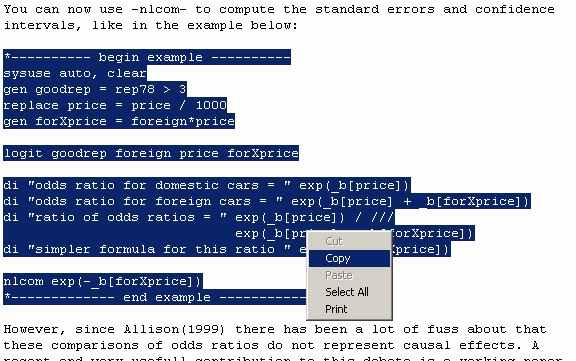
Within Stata type doedit in the command window:
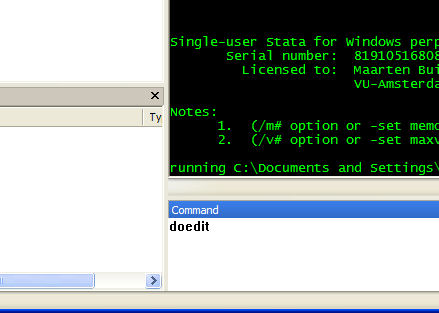
This will open the do-file editor:
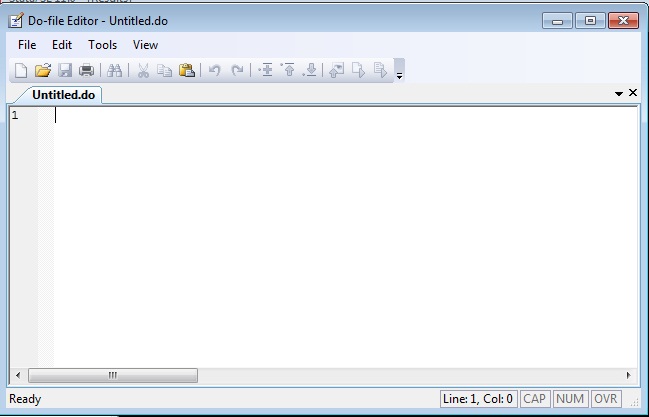
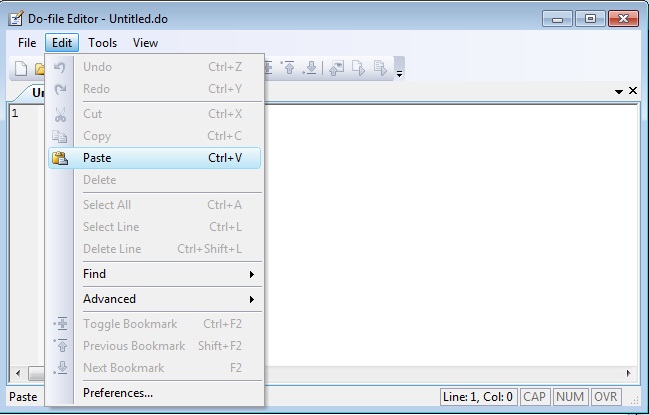
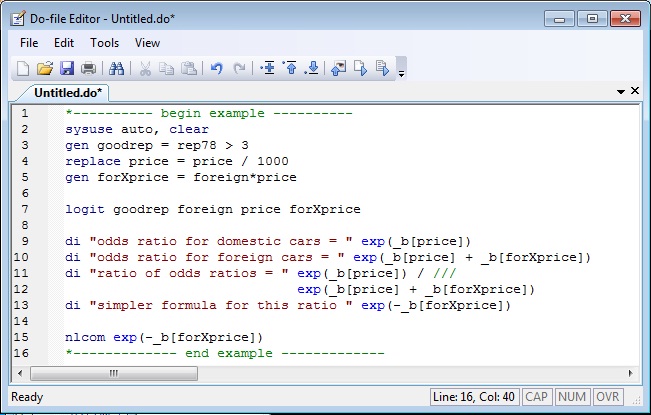
Paste the example in the do-file editor:
Do the do-file by pressing the last button on the right (see here for instructions for older versions of Stata):
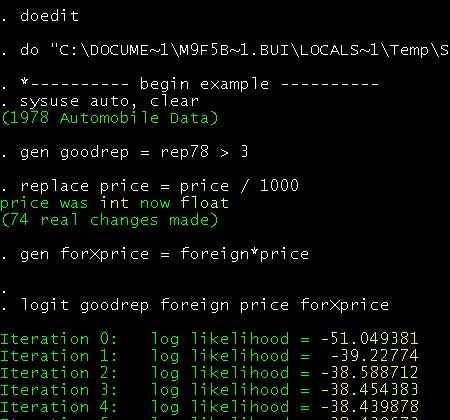
And you will get the output:
Why don't you just give the output?
a) The output usually doesn't format well in the message, making them very hard to read. Moreover, statalist doesn't allow attachments, so no graphs could be sent that way.b) The most useful part of an example is playing with it. This way, at each step of the example you can look at the variables, change some commands, add some commands, etc.
What does sysuse auto, clear mean?
For an example you need example data. The auto dataset is such an example dataset, and it is shipped with Stata, so everybody with Stata can use it. The command sysuse is just a convenient command to access example datasets that are shipped with Stata, i.e. you don't have to remember where Stata stored them. When using your dataset you should use the use command to load it.Why do you put things like long, double, or str8 between variable names when you use input?
Sometimes people sent the first couple of cases of the relevant variables in their dataset to show the structure of their data. Where possible I will use that data in my example, by using input. This command requires a list of variable names. The data type of these variables is by default float, i.e. numbers and accurate up to 8 digits. If the variable is a string (letters) the variable name has to be preceded with str# where # the length (number of characters) of the longest string in that variable. Sometimes these datasets contain a very long id variable. Depending on the length (number of digits) of this variable, I will want to input that variable as either a long, a double, or a str#. For more on this see this entry on the ATS websiteWhy do you recode rep78 1/2 = 3?
When I need a categorical or ordinal variable with more than two categories and I use the auto dataset, than I use the variable rep78. However, as can be seen below, the first two categories of this variable are almost empty. This can sometimes cause problems, so I often combine the first three categories .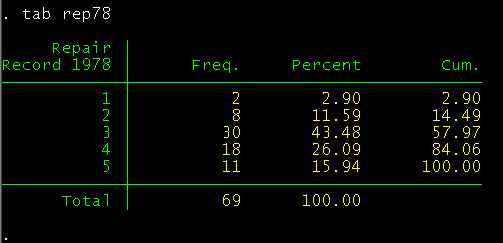
recode rep78 1/2 = 3 means that Stata will recode all values of rep78 from 1 trough 2 to the value 3. In this case it means that whenever Stata sees a 1 or a 2 it will change it to a 3. As a result all cars within the first three categories will now have the same code, i.e. the categories are combined.
Why do I add the variable baseline together with the nocons option?
This is something I did in older posts, before I had access to Stata 12. In Stata 12 this trick is no longer necessary, as is discussed here.
In older versions of Stata the issue was that Stata used to suppress the display of the constant when requesting the coefficients in exponentiated form. Depending on the model these exponentiated coefficients can be interpreted as odds ratio, risk ratios, incidence rate ratios, etc. To interpret the size of these ratios it is often useful to know the baseline odds, risk, incidence rate, etc, which happens to be the exponentiated constant. A doubling of these for a unit change in a explanatory variable is a lot more impressive if the baseline is already large: twice a small number is still a small number, but twice a large number is a huge number. Unfortunately, Stata used to suppress the display of this baseline value. I tricked Stata in displaying these values by first creating a variable baseline, which is always 1, and than add that variable to the model together with the nocons option, so this variable plays the role of constant without Stata knowing it. Also see this Stata Tip.
What does gen rep3 = rep78 == 3 if rep78 < . do?
It creates an indicator (dummy) variable that is 1 if rep78 is 3, missing if rep78 is missing, and zero otherwise. For a detailed explanation see this official Stata FAQ.Alternative and shorter methods for creating a series of indicator variables from rep78 are:
xi i.rep78
tab rep78, gen(rep)
However I don't like the variable names these commands produce.
Since Stata 11 one can add categorical variables directly without xi using factor variables.
What does gen rep3Xprice = (rep78 == 3)*price if rep78 < . do?
It creates an interaction between the variable price and an indicator (dummy) variable that is 1 if rep78 is 3, missing if rep78 is missing, and zero otherwise, without first making the indicator variable. For a detailed explanation see this official Stata FAQ. In many cases I would now use Stata's factor variables, but there are still situations where this is a convenient trick.Why do you sometimes add if rep78 < . to a command?
Within the auto dataset the variable rep78 is the only variable with missing values. Missing values in Stata are represented by a . and are the largest possible values. So any value less than . are valid observations. For a detailed explanation see this and this official Stata FAQ.What does !missing(var1,var2) mean?
The function missing(var1,var2) returns a 1 (=true) for every observation where var1 and/or var2 are missing and a 0 (=false) otherwise. The ! is a negation, so together they return a "true" for every observation that has observed values on both var1 and var2, and a "false" for all other observations. Also see this official Stata FAQ.What does gen domestic = !foreign do?
It creates a dummy variable that is 1 if the car is domestic and 0 if it is foreign. This is a convenient way to "flip" a dummy variable. For a detailed explanation see this official Stata FAQ. Notice I did not add if foreign < .. This is bad style, but it works since I know that the variable foreign does not contain any missing values.What does gen marst = !never_married + married if !missing(never_married, married) do?
In one of the build-in datasets, nlsw88, marital status is included as two indicator variables, aptly called never_married and married. In order to make use of the factor variable notation I need to combine these into a single categorical variable. I like the order 0=never married, 1=widowed/divorces, 2=married, this is what the above command gives me.
If someone is never married, she will have a 1 on never_married and a 0 otherwise. The ! reverses that, so !never_married will be 0 when never married and 1 otherwise. married will be 1 when the person married and 0 otherwise. So when someone is never married she will receive a 0 + 0 = 0 on marst. When someone is divorced/widowed she will receive a 1 + 0 = 1 on marst. When someone is married she will receive a 1 + 1 = 2 on marst.
Finally, the ! does not just reverses 0 into 1 and vice versa, but it turns all non-zeros, including missing values, into 1. So to keep the missing values missing I need to add if !missing(never_married, married).
What does _I* mean?
After xi Stata creates new variables with names that start with _I. If I want to refer to all variables created by xi (and I didn't had any variables with names starting with _I before I called xi) than I can do so by typing _I*. The * is a wildcard, so _I* can be read like all variables whose name start with _I, see help varlist.What does the ? mean in w??
All variables whose name begins with a w and with only one other character, see help varlist.What does # or ## mean in a list of variables?
It means that I am using Stata's factor variable notation to create interactions. Typically I would use that in combination with i.varname to indicate that varname is to be treated as a categorical variable and/or c.varname to indicate that varname is to be treated as a continuous variable. As a special case I can also use the factor variable notation to include a quadratic curve by typing c.varname##c.varname. This will include varname and varname2 to the model.What does floor(x) or ceil(x) mean?
ceil(x) always rounds the number x up to the next integer, while floor(x) always rounds the number x down to the preceding integer. So ceil(6.1)=7 and ceil(6.9)= 7, while floor(6.1)=6 and floor(6.9)=6. This allows for some neat little tricks, as discussed in this Stata tip and this Stata tip.What does mod(x, y) mean?
mod(x, y) returns the remainder when dividing x by y. So, mod(1,2)=1, mod(2,2)=0, and mod(3,2)=1. This allows for some neat tricks as discussed in this Stata tip.Where did the _N or _n come from?
Sometimes it is necessary to know the total number of observations or the current observation number. In Stata these are called respectively _N and _n. For more see this entry on the ATS website. There is however one exception: _n within the display command (often abbreviated as di) means: "display a new line" instead of "current observation number".What does bys var : gen byte mark = _n == 1 followed by twoway ... if mark ... do?
This typically happens when I want to plot predictions and I know that that prediction is the same for all observations that share the same value of var. If I did not do this I would plot a marker for each observation, even though many would be overlaid on top of one another and you would not see them. This tends to make Stata graphs large (in terms of memory) and slow. With this trick I prevent this by plotting only one marker per unique value of var. Also see this Stata tip.What does `=sqrt(5)' or `=_N+3' do?
Within some Stata commands there are options that require one to give a number, while I actually want to give it an expression. By typing the expression as `=expression', the expression is evaluated and all Stata sees is the number that is the result of the expression, making both me and Stata happy. Notice the ` and the ', they are necessary.What does `: something' do?
A very powerful way of manipulating the content of macros is using so called extended macro functions. For example if I want to remove duplicate elements in a macro foo I can typelocal foo "a b b a" local foo_uniq : list uniq foo di `"`foo_uniq'"'If all I want to do is display the results, I can use a short-cut:
local foo "a b b a"
di `"`: list uniq foo'"'
What does 1e4 or 2.1e-4 mean?
with very large or very small numbers one can end up typing and (mis)counting lots of zeros. I sometimes avoid this by typing those numbers in exponential format. So 1e4 is 1×104=10,000 and 2.1e-4 is 2.1×10-4=0.00021.What does if !_rc mean?
You can let Stata ignore errors in a command and continue by prefixing it with the capture command. The statement if !_rc immediately following capture means "do whatever follows if there was no problem".capture will leave behind the scalar _rc, which contains the return code. The return code is the code assigned to error messages. For example r(198) or r(505). The code 0 is reserved for "no problems". In Stata logic the value 0 is "false" and the ! negates a logical statement. So if everything went ok !_rc will evaluate to !0, which is "not false" or "true". All non-zero values are treated as "true", so if there was a problem than !_rc will evaluate to "not true" or "false". Also see this official Stata FAQ.
What does vecdiag(cholesky(diag(vecdiag(V))))' mean?
I typically use this to create a column vector containing standard errors. To be exact, this command creates a column vector containing the square root of the diagonal elements of the matrix V. Stata estimation commands typically store the variance covariance matrix and not the standard errors. The diagonal elements of the variance covariance matrix are the standard errors squared. So the square root of the diagonal elements of this matrix are the standard errors. Nowadays I more often use the set of tricks discussed in this Stata tip.What does _dots do?
Within a loop one can use the _dots command to display dots that will tell you how far the loop has progressed (and how long you'll have to wait till it is finished). For more, see this Stata tip.Why do some lines end with /* and the next line begin with */?
If Stata sees a hard return it interprets that as the end of the command. Some commands get so long that they do not fit on one line and you want to break it up. Breaking the command by adding hard returns is a bad idea since Stata will see each hard return as the end of a command. A solution is to comment the hard return out. Comments are texts within a do file that are for human readers only and are ignored by Stata. One way to identify a piece of text as a comment is to put it between /* and */. Stata will ignore anything that is between these two symbols, including hard returns. So if you end a line with /* and begin the next with */, Stata will think it is all on one line, so one command. An alternative is to end a line with ///. You can find more on this in the User's guide chapter 16.1.3 ([U] 16.1.3).Why do some lines end with ///?
/// is a way to break up a long command over multiple lines. You can find more on this in the User's guide chapter 16.1.3 ([U] 16.1.3).What does #delim ; and #delim cr do?
Sometimes I want to wrap a line inside a string. For instance, I am making a local that contains a very long string. Now I cannot use the technique in the section above. Instead I change the delimiter to ;, so Stata no longer considers an enter as a sign of the end of a command, but continues reading until it sees a ;. When I am done with that string I usually change the delimiter back to return by typing #delim cr.What do the lines tempname b and scalar `b'=... do?
These two lines are used to store a number in the scalar `b'. It is similar to typing local b = ..., except that a local is accurate to a minimum of 11 decimal digits, while a scalar is accurate to 15 or 16 decimal digits. See the User's guide chapter 18.5 ([U] 18.5), and this post by Bill Gould. I use scalars when I think numerical precision might matter.What does tempfile do?
Sometimes it is necessary or convenient to store some data. However, I don't want to keep it, so I often use tempfile. If I type tempfile temp than that reserves the name `temp' (note the ` and the '), which I can use when I store data. That dataset will remain available for as long the do-file runs, and is immediately removed once the do-file has finished.What does capture program drop do?
Sometimes it is necessary or convenient to create a program within a do-file. When writing the example I often (always) don't get it right the first time round, so I do a do-file many times. The second time I do a do-file that creates a program Stata will complain, since I will attempt to create a program that already exists. So I first need to drop that program, before I can create it again. Lets say I named the program prog, than I should type program drop prog, before I create the program. However, if I sent the example like this to the statalist, than it will complain the first time a statalist member tries to run the example, since that example will try to drop the program prog which does not yet exists. That is what the command capture is for: this will ensure that Stata will continue running even if program drop prog creates an error.I could remove the line program drop prog, and than it would run fine the first time. However, someone would get an error message if she started to play with the example (which is the best way to understand it) and do it multiple times.